Celesto cut median Rust compile time from 18.14 seconds on GitHub-hosted runners to 11.60 seconds: 36% less time, with the same CPU and RAM allocation.
That saved about 6.5 seconds per compile in this fixture. The result covers an offline release build, not a cache hit or the full CI job. Both providers had 4 vCPUs and 16 GiB of nominal RAM; their physical CPUs and host environments differed.
Save 36% of compile time without a larger runner
| Offline Rust release compile | GitHub-hosted | Celesto CI |
|---|---|---|
| Median wall time | 18.14 s | 11.60 s |
| Observed min–max | 14.00–20.32 s | 10.49–11.80 s |
| Repetitions | 5 | 5 |
| Allocated CPU / nominal RAM | 4 vCPU / 16 GiB | 4 vCPU / 16 GiB |
The reduction is (18.135 - 11.600) / 18.135 ≈ 36%. It is a reduction in elapsed compile time, not a claim that the full pipeline or every Rust project becomes 36% faster.
The public fixture has 39 locked crates and uses Rust 1.90.0. The harness fetches crates before the timed phase, then runs cargo build --frozen --release -j4 with the container network disabled. No build-output cache is restored. The resulting executable must confirm 1,000 expected matches.
The raw logs and independent validation receipt preserve every sample. Five samples describe this experiment, not a confidence interval or a universal speed advantage.
Measure the Rust compile separately from crate downloads
First, install the Celesto CI GitHub App, select your repository, and connect it to a workspace with credit eligible for the Large runner.
Add .github/workflows/rust-compile.yml. This example checks out the public fixture, so you do not need private application code:
name: Measure Rust compile time

on: workflow_dispatch

permissions:
  contents: read

jobs:
  compile:
    runs-on: [self-hosted, celesto-large]
    timeout-minutes: 15
    steps:
      - uses: actions/checkout@v4
        with:
          repository: CelestoAI/ci-benchmarks
          ref: e4461a43c193d56560c7df56ceff7fb3170cee78
          path: ci-fixture

      - name: Fetch crates before the timed phase
        run: |
          RUST_IMAGE=$(python3 -c 'import json; print(json.load(open("ci-fixture/docker-bench/images.json"))["rust"])')
          echo "RUST_IMAGE=$RUST_IMAGE" >> "$GITHUB_ENV"
          docker run --rm \
            -v "$PWD/ci-fixture/docker-bench/rust:/app" -w /app \
            -e CARGO_HOME=/app/.cargo \
            "$RUST_IMAGE" cargo fetch --locked

      - name: Time the offline release compile and check its output
        run: |
          docker run --rm --network=none \
            -v "$PWD/ci-fixture/docker-bench/rust:/app" -w /app \
            -e CARGO_HOME=/app/.cargo \
            "$RUST_IMAGE" bash -ec '
              test "$(nproc)" -eq 4
              TIMEFORMAT="compile_seconds=%R"
              time cargo build --frozen --release -j4
              ./target/release/ci-compile-fixture --rows 1000
            '
Open Actions → Measure Rust compile time → Run workflow. The log reports compile_seconds for Cargo’s release build. Image pulls, crate downloads, and the executable check are outside that timer.
This short workflow exposes the CPU phase; it does not reproduce every tool-version control or the five-repeat comparison. Its base image digest comes from the pinned fixture revision. Use a reviewed commit pin for actions/checkout under your repository’s action policy.
For a GitHub-hosted control, select a runner with the same four-vCPU / 16-GiB allocation and keep the image, lockfile, compiler flags, and source unchanged. A different runs-on label alone does not prove that resources match. The full benchmark also records CPU model, kernel, and runtime versions.
The example relies on the VM’s existing CPU allocation. Do not add docker run --cpus=4: that flag failed Celesto preflight because a nested cgroup control file was absent.
Choose the runner by workload, not the CPU result alone
Celesto’s CPU advantage did not extend to every Docker task. GitHub took less time on the tested portable-cache rebuilds; the Python/PostgreSQL/Azurite stack passed on both providers with a small median gap. The full experiment completed 120 successful jobs, but the Rust result still has five samples per provider, not 120.
See where cache and image-transfer costs outweigh the CPU advantage
Celesto cut Rust compile time by 36%; GitHub won portable-cache rebuilds
Both providers received four vCPUs and 16 GiB of nominal RAM. Each cache scenario ran on a fresh runner. The suite pinned Docker, Buildx, Compose, BuildKit, dependency files, and base-image digests.
| Workload | GitHub-hosted | Celesto CI |
|---|---|---|
| Offline Rust release compile | 18.14 s | 11.60 s |
| Python API + PostgreSQL + Azurite CI | 40.44 s | 42.39 s |
| Two image builds, no reusable build cache | 21.69 s | 25.81 s |
| Source-only rebuild, portable cache, transfer included | 22.80 s | 30.43 s |
| PostgreSQL + Azurite cache restore plus Docker load | 8.14 s | 12.18 s |
Values are medians of five repetitions per provider and scenario. Lower is better. These are workload times, not queue-to-result times; tool setup and post-job cleanup are outside these durations.
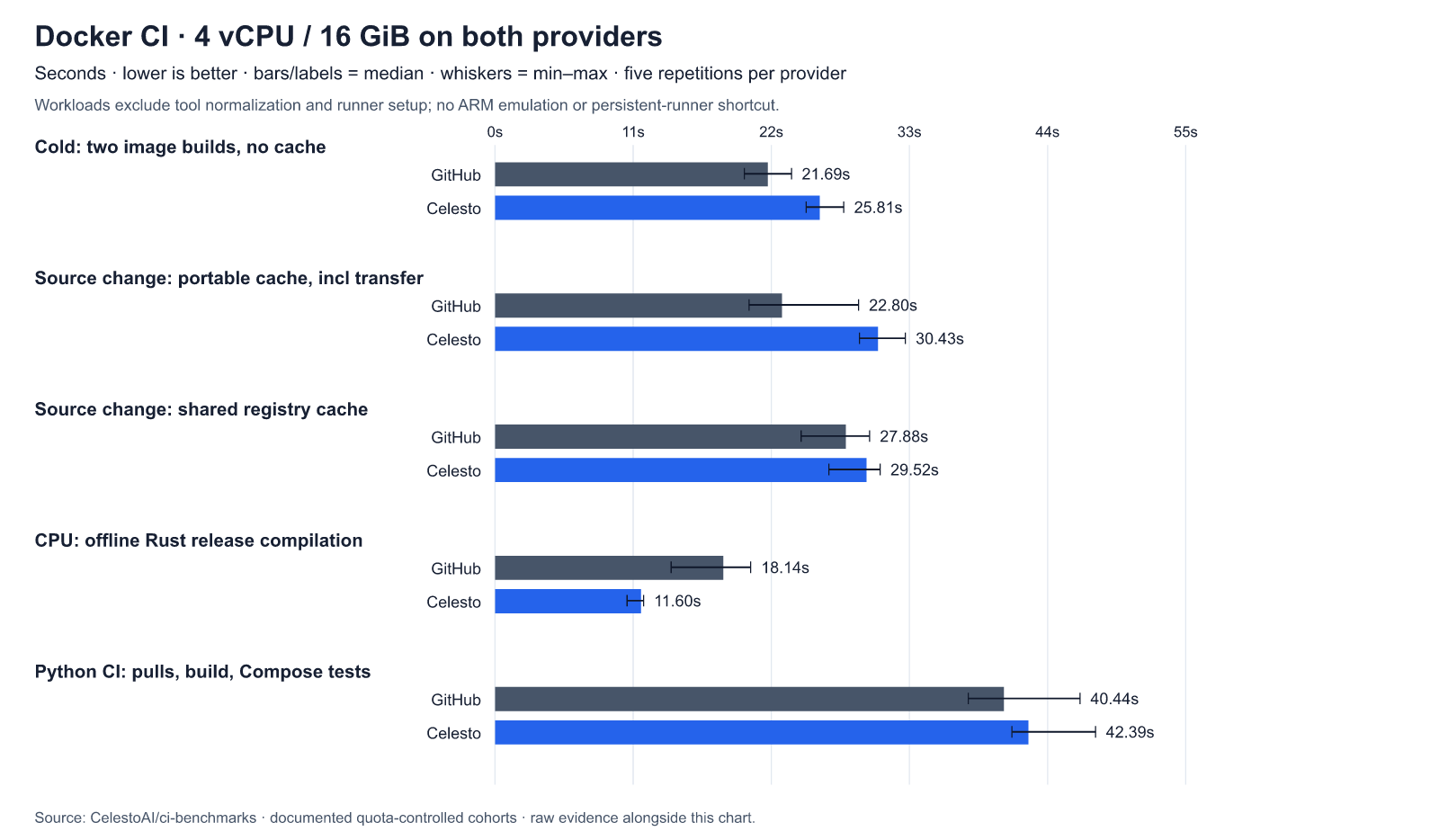
Celesto’s Rust compile took about 36% less time. The Python stack passed on both providers, with a small median gap. GitHub took less time on the tested portable-cache rebuilds.
All 80 expected dependency-layer hits and 40 exact archive restores passed validation. A hit did not guarantee a faster job: for these fixtures, cache transfer and image load could cost more than the work they replaced. Direct pulls of PostgreSQL and Azurite took 7.49 seconds on GitHub and 8.72 seconds on Celesto, less than each provider’s median cache restore plus Docker load.
CPU counts and memory matched; physical CPU models, kernels, storage, network location, and host runtime packages did not. Five samples describe this experiment, not a universal speed advantage or a confidence interval. See the report, observed ranges, and raw evidence.
Avoid failed preflight paths: direct GHA cache export and --cpus
The successful suite used Docker commands, Compose, a shared registry layer cache, and portable layer archives through actions/cache. Two Celesto preflight checks failed:
- Direct BuildKit
type=gha,version=2cache export crashed in both attempts. A portable archive or registry cache is a different path, not a fix for this failure. - Docker’s explicit
--cpus=4flag failed because a nested cgroup control file was absent. The repeated comparison used the existing four-vCPU VM allocation on both providers, without that flag.
These results validate the tested workflows. They do not certify every Docker action, job-container option, service-container configuration, or resource-limit flag. The compatibility notes include the failed preflight runs.
Test SQL and Azure Blob operations in a separate Docker job
Catch image failures before you add service tests
First, install the Celesto CI GitHub App, select your repository, and connect it to a Celesto workspace with credit eligible for the Large runner.
The example uses a public Python API fixture, so you do not need a private application or a new test project. Its image has hash-locked Python dependencies and a self-test that imports the database and Azure clients. That self-test does not connect to either service yet.
Add .github/workflows/docker.yml to your repository:
name: Docker on Celesto

on: workflow_dispatch

permissions:
  contents: read

jobs:
  test:
    runs-on: [self-hosted, celesto-large]
    timeout-minutes: 15
    steps:
      - uses: actions/checkout@v4

      - name: Fetch the public API fixture
        uses: actions/checkout@v4
        with:
          repository: CelestoAI/ci-benchmarks
          ref: e4461a43c193d56560c7df56ceff7fb3170cee78
          path: ci-fixture

      - name: Build the API image
        run: |
          BASE=$(python3 -c 'import json; print(json.load(open("ci-fixture/docker-bench/images.json"))["python"])')
          docker build --build-arg "BASE=$BASE" \
            -t app:ci ci-fixture/docker-bench/python

      - name: Check the image
        run: |
          test "$(docker run --rm app:ci python app.py --self-test)" = 42
Open Actions → Docker on Celesto → Run workflow. The last step must exit successfully. A missing dependency or a failed image build fails the job.
Docker is already present on the Docker-enabled runner image. The base image digest comes from the fixture’s images.json; it is not a mutable Python tag. The checkout action uses a short version reference for readability; use a reviewed commit pin under your repository’s action policy.
For your own application, replace the fixture checkout, build context, and self-test with your project’s image and test command. Do not expect pytest to exist in a production image unless your Dockerfile includes it.
Prove SQL and blob operations work, not just service health
Fail the job when SQL or blob results are wrong
Keep the workflow through Build the API image. Add this compose.yaml to your repository root. The first checkout supplies this file; the second supplies the API fixture.
services:
  postgres:
    image: ${POSTGRES_IMAGE:?Set POSTGRES_IMAGE}
    environment:
      POSTGRES_PASSWORD: benchmark-only
    healthcheck:
      test: ["CMD-SHELL", "pg_isready -U postgres"]
      interval: 1s
      timeout: 3s
      retries: 60

  azurite:
    image: ${AZURITE_IMAGE:?Set AZURITE_IMAGE}
    environment:
      # Disposable emulator account, not an Azure credential.
      AZURITE_ACCOUNTS: benchmark:YmVuY2htYXJrLXNtb2tlLWtleS1ub3QtYS1zZWNyZXQ=
    command: >-
      azurite --blobHost 0.0.0.0 --queueHost 0.0.0.0
      --tableHost 0.0.0.0 --skipApiVersionCheck
    healthcheck:
      test:
        - CMD
        - node
        - -e
        - >-
          require('http').get('http://127.0.0.1:10000/',
          r => process.exit(r.statusCode === 400 ? 0 : 1))
          .on('error', () => process.exit(1))
      interval: 1s
      timeout: 3s
      retries: 60

  api:
    image: app:ci
    ports:
      - "127.0.0.1:8080:8080"
    environment:
      DATABASE_URL: postgresql://postgres:benchmark-only@postgres/postgres
      AZURITE_KEY: YmVuY2htYXJrLXNtb2tlLWtleS1ub3QtYS1zZWNyZXQ=
    depends_on:
      postgres:
        condition: service_healthy
      azurite:
        condition: service_healthy
    healthcheck:
      test:
        - CMD
        - python
        - -c
        - >-
          import urllib.request;
          urllib.request.urlopen('http://127.0.0.1:8080/health', timeout=2)
      interval: 1s
      timeout: 3s
      retries: 60
Azurite returns HTTP 400 for the unsigned root request in its health check. That response proves the HTTP endpoint responds. It does not prove that a blob operation succeeds; the API test below checks that separately.
Replace Check the image with these workflow steps:
- name: Resolve pinned service images
  run: |
    python3 - <<'PY' >> "$GITHUB_ENV"
    import json
    from pathlib import Path

    images = json.loads(Path("ci-fixture/docker-bench/images.json").read_text())
    for name in ("postgres", "azurite"):
        print(f"{name.upper()}_IMAGE={images[name]}")
    PY

- name: Start services
  run: docker compose -p ci up -d --wait --wait-timeout 120

- name: Test SQL and Azure Blob roundtrips through the API
  run: |
    python3 - <<'PY'
    import json
    import urllib.request

    expected = {"rows": 1000, "sum": 499500, "blob_bytes": 1048576}
    for _ in range(5):
        with urllib.request.urlopen("http://127.0.0.1:8080/exercise", timeout=30) as response:
            actual = json.load(response)
        assert actual == expected, actual
    print("SQL and blob assertions passed in all five rounds")
    PY

- name: Show service logs
  if: always()
  run: docker compose -p ci logs --no-color

- name: Remove this job's services and volumes
  if: always()
  run: docker compose -p ci down --volumes
Each API request creates a test table, inserts 1,000 rows, checks the count and sum, uploads a 1-MiB blob, downloads it, and checks its bytes. An API error or an incorrect result fails the job. The API source contains those assertions.
The database and emulator credentials belong only to these disposable CI services. Do not point this fixture at a production database: it truncates its test table. The final step removes the Compose project’s volumes even after a test failure.
These examples adapt the tested fixture for a short tutorial. They do not reproduce every benchmark control or its exact durations.
Use a pilot before you spend credit on 120 jobs
Point your fork at its own cache package before the pilot
Fork CelestoAI/ci-benchmarks, enable Actions, and connect the Celesto App to your fork. This step uses the benchmark repository’s own workflows, not the short example workflows above.
The experiment’s registry-cache reference in docker-bench/run.py, inside cache_options, points to the original organization’s GHCR package. Before the pilot, replace that reference with a package under your own lowercase GitHub account or organization, then commit the edit to your fork:
ref = "ghcr.io/your-account/ci-benchmarks-cache:" + scopeDo not try to write to ghcr.io/celestoai/ci-benchmarks-cache from a fork. The workflow grants packages: write for its own repository; that does not grant access to another organization’s package.
Set repository secrets for a Docker Hub account and a personal access token with public-repository read permission. These commands prompt for values; do not put the token in shell arguments or workflow files.
gh secret set DOCKERHUB_USERNAME --repo YOUR_ACCOUNT/ci-benchmarks
gh secret set DOCKERHUB_TOKEN --repo YOUR_ACCOUNT/ci-benchmarks
Start with the pilot and a namespace you have not used before:
gh workflow run celesto.yml \
  --repo YOUR_ACCOUNT/ci-benchmarks \
  --ref main \
  -f mode=pilot \
  -f namespace=docker-yourname-pilot-001
The pilot checks the workloads. It is not the five-repeat experiment.
Full mode schedules 120 jobs and consumes runner credit. Before you run it, check Docker Hub pull allowance and roughly 4.5 GiB of free cache headroom per provider, plus any existing cache usage. Full mode does not automatically pace registry pulls.
Use a new namespace for the full run:
gh workflow run celesto.yml \
  --repo YOUR_ACCOUNT/ci-benchmarks \
  --ref main \
  -f mode=full \
  -f namespace=docker-yourname-full-001
The suite separates two cache paths:
- Registry: both providers use the same GHCR BuildKit cache backend, with
mode=max. - Portable: both export local BuildKit layers, then transfer those files through their own
actions/cacheendpoint.
Cold, unchanged, source-only, and dependency-lock-change scenarios have separate results. Warm source builds must prove a dependency-install layer hit. A dependency change must prove that the install executes.
The original experiment reached Celesto’s cache quota, and a later attempt reached Docker Hub’s anonymous pull limit. Those failures remain in the report as diagnostics. All 120 final jobs used authenticated Docker Hub pulls on both providers. Task-owned cache cleanup, registry-quota pauses, and a local dispatcher connection failure are disclosed; none is hidden as a fast measurement. The final comparison measures cache performance with available quota, not cache retention under storage pressure.
Follow the full reproduction guide for the smaller paired modes, resource controls, and evidence collector.
Check your own Rust build before you change the whole pipeline
Start with one CPU-bound Rust job. Compare its compile time and complete job duration on equal runner sizes, then repeat enough times to expose host variation. The measured 36% reduction is a reason to test Celesto on your project, not a guarantee for a different dependency graph or pipeline.