Docker is not inherently insecure. Its default isolation often suits applications and code that you trust.
The choice changes when an AI agent may execute hostile code. Docker containers share the host Linux kernel. MicroVMs give each workload a separate guest kernel behind a hardware virtualization boundary.
That architectural difference—not ordinary Docker misconfiguration—is why a microVM provides a stronger default for untrusted agent workloads.
Choose the boundary from the workload
| Workload | Sensible default |
|---|---|
| Your application or reviewed code | Docker |
| Local development with limited consequences | Docker |
| Unknown repositories or generated code | MicroVM |
| Multi-tenant agent execution | MicroVM |
| A workload with access to sensitive credentials | MicroVM with strict credential policy |
This is not a choice between “secure” and “insecure.” It is a choice between two security boundaries with different attack surfaces and failure modes.
A normal container cannot access its host merely because it shares the host kernel. An attacker still needs granted host access or a flaw in the kernel, container runtime, or control plane. A microVM adds another boundary that the attacker must cross.
Why AI agents need a stronger boundary
An AI agent may receive a repository and this task:
Fix the test failures and open a pull request.
The agent may execute:
npm install
npm test
pip install -r requirements.txt
make
cargo build
Each command can execute code that the agent operator did not author. An npm package can contain install scripts. A Makefile can execute arbitrary shell commands. A dependency can be compromised upstream. A repository or webpage can also contain instructions that alter the agent’s behavior.
The agent does not need malicious intent. It only needs to act on malicious input.
A traditional application container often follows this path:
source code -> review -> CI -> image build -> productionAn agent workload can follow a much shorter path:
unknown input -> agent -> shell command -> immediate executionAn autonomous workload may also get thousands of attempts to inspect its environment, vary parameters, observe errors, and try another path. The isolation boundary therefore becomes part of the attack surface.
What a Docker container actually is
A Docker container is not a small virtual machine.
At the Linux level, it is a set of processes on the host kernel with several isolation controls around them.
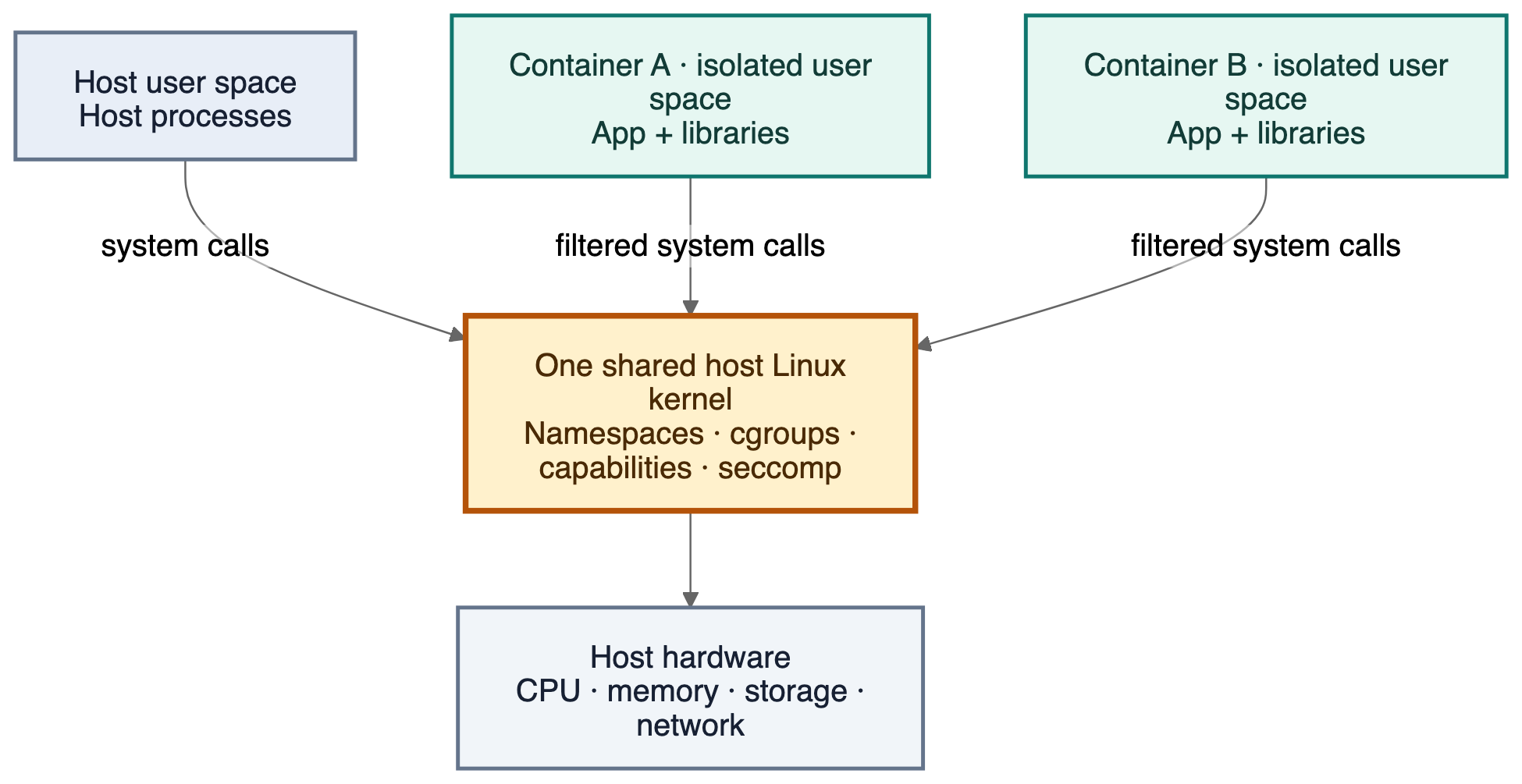 Each container has an isolated user space, but its system calls still reach the host’s shared Linux kernel.
The main controls are:
- Namespaces isolate processes, mounts, the network, IPC, and hostnames.
- cgroups account for and restrict CPU, memory, and other resources.
- Linux capabilities divide root privileges into smaller permissions.
- seccomp restricts the system calls that a process can make.
- AppArmor or SELinux adds policy around resource access.
- Filesystem isolation gives the container its own root filesystem unless the operator shares a host path.
The kernel remains shared. If a container calls open(), mount(), clone(), ioctl(), or another system call, that request reaches the same Linux kernel that serves host processes. Namespaces and policy controls decide what the process can see and what the kernel will permit.
A shared kernel increases the value of a kernel exploit. It does not automatically give a container access to the host.
On macOS and Windows, Docker Desktop puts Linux containers inside a Linux virtual machine. Those containers share the kernel of that virtual machine, not the macOS or Windows kernel.
What Docker prevents by default
Start a normal container:
docker run --rm -it ubuntu:24.04 bashThe process inside it does not normally have access to the host root filesystem, every host process, every Linux capability, or arbitrary filesystem mounts.
Docker also applies a default seccomp profile unless the operator replaces or disables it. The current profile blocks about 44 system calls out of more than 300. The blocked set covers kernel module operations, several namespace operations, mount, reboot, setns, and other sensitive calls. See Docker’s seccomp documentation.
For example, this command fails in a normal container:
mount -t tmpfs none /mntDocker drops CAP_SYS_ADMIN by default, so the kernel rejects the operation. This is real isolation.
What a correct Docker configuration still shares
Docker’s defaults provide a real boundary, but they do not remove shared fate between the workload and the host.
Even with a careful configuration:
- Container system calls still reach the host kernel.
- A host-kernel flaw can affect the host and every container on it.
- A flaw in
runc,containerd, Docker, or another runtime component can defeat isolation. - Every container on the host depends on the same kernel and runtime patch level.
- An autonomous agent can probe the boundary across many requests.
This is the core argument for a microVM. A separate guest kernel contains a guest-kernel compromise inside the virtual machine unless the attacker also defeats the hypervisor or another host interface.
A microVM is not invulnerable. It moves the workload away from the host kernel and adds a hardware-enforced boundary. The host still needs a patched hypervisor, strict device policy, narrow file shares, and safe credential controls.
Configuration can remove Docker’s protections
Poor configuration is a separate problem. It is not the reason that Docker and microVMs have different security properties, but it can erase the isolation that Docker provides.
Avoid these options for untrusted workloads:
- Docker socket access: A process that controls a rootful Docker daemon can ask it to create containers with host mounts, devices, extra capabilities, or privileged mode. See Docker daemon socket protection.
- Writable host mounts: A container can alter any host path that the operator shares with write access. Share narrow paths and use
readonlyorrowhere possible. See Docker bind mounts. - Privileged mode:
--privilegedgrants all Linux capabilities, exposes host devices, and relaxes security policy. See Docker container runtime options. - Host namespaces: Options such as
--pid=hostand--network=hostremove namespace boundaries. - Extra capabilities: Broad capabilities such as
CAP_SYS_ADMINexpose more kernel interfaces. - Disabled security policy:
seccomp=unconfinedor weak AppArmor and SELinux policy removes defense layers. - Unsafe control-plane parameters: A sandbox API must reject host mounts, devices, namespaces, capabilities, and security options that the workload does not need. See Docker’s daemon attack-surface guidance.
These options explain how operators can weaken Docker. They do not prove that a default container has no security boundary.
Optional lab: inspect the shared-kernel boundary
This lab compares the host and container kernels, namespaces, capability masks, and seccomp state. It does not weaken Docker or attempt an escape.
Use a Linux host with Docker Engine. Docker Desktop adds a virtual machine between the container and the native macOS or Windows host.
Create this project:
docker-boundary-demo/
├── Dockerfile
├── package.json
├── tsconfig.json
└── src/
    └── inspect-isolation.ts
Project files
Create package.json:
{
  "name": "docker-boundary-demo",
  "private": true,
  "type": "module",
  "scripts": {
    "build": "tsc"
  },
  "devDependencies": {
    "@types/node": "^24.0.0",
    "typescript": "^6.0.0"
  }
}
Create tsconfig.json:
{
  "compilerOptions": {
    "target": "ES2022",
    "module": "NodeNext",
    "moduleResolution": "NodeNext",
    "rootDir": "src",
    "outDir": "dist",
    "strict": true
  },
  "include": ["src/**/*.ts"]
}
Create Dockerfile:
FROM node:24-bookworm-slim AS build
WORKDIR /app
COPY package.json tsconfig.json ./
RUN npm install
COPY src ./src
RUN npm run build

FROM node:24-bookworm-slim
WORKDIR /app
COPY --from=build /app/dist ./dist
CMD ["node", "dist/inspect-isolation.js"]
For a production repository, commit a lockfile and replace npm install with npm ci.
Create src/inspect-isolation.ts:
import { existsSync, readFileSync, readlinkSync, readdirSync } from "node:fs";

const namespaces = Object.fromEntries(
  readdirSync("/proc/self/ns").map(name => [
    name,
    readlinkSync(`/proc/self/ns/${name}`),
  ])
);

const status = readFileSync("/proc/self/status", "utf8");

const security = Object.fromEntries(
  status
    .split("\n")
    .filter(line =>
      ["CapEff:", "CapBnd:", "NoNewPrivs:", "Seccomp:"].some(key =>
        line.startsWith(key)
      )
    )
    .map(line => {
      const [key, ...value] = line.trim().split(/\s+/);
      return [key.replace(":", ""), value.join(" ")];
    })
);

console.log({
  kernel: readFileSync("/proc/sys/kernel/osrelease", "utf8").trim(),
  namespaces,
  security,
  dockerSocketPresent: existsSync("/var/run/docker.sock"),
});
Run the comparison
Build the image:
docker build -t docker-boundary-demo .Record the host kernel and selected namespace IDs, then start the container:
uname -r
readlink /proc/self/ns/{pid,mnt,net}
docker run --rm docker-boundary-demo
Compare the results:
- The container reports the same Linux kernel release as the host.
- The PID, mount, and network namespace IDs differ.
- The Docker socket does not exist inside the normal container.
- The capability masks have a restricted set.
- The
Seccompfield reports the active seccomp state on the host.
This proves the shared-kernel model without a host-access attempt.
Clean up the lab:
docker image rm docker-boundary-demoWhy a microVM changes the failure boundary
Docker and microVMs both isolate workloads. They place the strongest boundary in different locations.
| Property | Docker container | MicroVM |
|---|---|---|
| Kernel | Shares the host kernel | Uses a guest kernel |
| Primary boundary | Namespaces, capabilities, seccomp, and LSM policy | Hardware virtualization and a hypervisor |
| Host-kernel exposure | Container system calls reach it directly | Guest system calls reach the guest kernel |
| If the workload compromises its kernel | The host kernel is already the target | The attacker remains inside the guest and needs another path to the host |
| Resource cost | Lower | Higher |
| Best fit | Trusted or reviewed code | Hostile or unknown code |
The extra boundary matters most when the workload has a reason to attack the platform. An unknown repository, package script, or generated command can target the shared kernel. Inside a microVM, the same code first encounters the guest kernel.
This does not make every microVM safer than every container. A weak microVM policy can expose host files, credentials, devices, or control-plane APIs. Compare correct configurations on both sides.
What recent runc flaws teach us
A container also depends on the runtime that constructs its namespaces, mounts, devices, and process state. Recent runc advisories show how flaws in that setup path can defeat isolation even when an operator does not grant obvious host access.
- CVE-2025-31133, published November 5, 2025: A race around masked paths could expose host data, crash the host, or lead to a container escape. Patched releases:
1.2.8,1.3.3, and1.4.0-rc.3. - CVE-2025-52881, published November 5, 2025: Procfs write redirection and mount races could bypass an LSM, crash the host, or support an escape. Patched releases:
1.2.8,1.3.3, and1.4.0-rc.3. - CVE-2025-52565, published November 5, 2025: Races around the
/dev/consolemount could cause host denial of service or a container escape. Patched releases:1.2.8,1.3.3, and1.4.0-rc.3. - CVE-2026-41579, published June 13, 2026: A malicious image with a
/devsymlink could cause limited host filesystem integrity violations in affected integrations. Patched releases:1.3.6,1.4.3, and1.5.0-rc.3. The upstream advisory states that this flaw is not exploitable under Docker because Docker masks the malicious/devsymlink with a top-level read-only layer.
These advisories do not make every container unsafe. They show that the container boundary depends on software in the host kernel and runtime. A microVM replaces direct host-kernel exposure with a guest kernel and hypervisor boundary, which changes the path and potential blast radius of a compromise.
A practical policy for agent workloads
Docker can suit an agent workload when all of these conditions hold:
- The operator trusts the code or reviews it before execution.
- The container has no Docker socket or broad host mount.
- The process has a non-root UID and the minimum capability set.
- The default seccomp and AppArmor or SELinux policies remain active.
- The root filesystem is read-only where practical.
- CPU, memory, process, and execution-time limits exist.
- Network access follows an explicit policy.
- The control plane validates mounts, devices, namespaces, capabilities, and security options.
This policy preserves Docker’s intended isolation. It does not give the workload a separate kernel.
For stronger Docker isolation, consider rootless mode or user-namespace remap. These controls reduce host privilege, but they do not give the workload a separate kernel.
Prefer a microVM when the service accepts unknown repositories, package scripts, generated commands, or repeated requests from an attacker. A microVM gives each workload a guest kernel and puts a hypervisor boundary between that kernel and the host.
A microVM still needs strict policy. Do not expose host credentials, broad file shares, unsafe control-plane options, or unrestricted network access merely because a VM boundary exists.
Bottom line
Docker is secure enough for many workloads. That does not mean it provides the strongest boundary for hostile code.
For trusted or reviewed code, Docker often provides the right balance of speed, density, and isolation. For unknown code, a microVM provides a stronger default because the workload does not share the host kernel.
Choose the boundary from the code you execute and the cost of a successful escape—not from a claim that either technology is universally secure or insecure.